
Driving VirtuProbe from an agent
VirtuProbe can be driven by an external AI agent as one tool in a larger workflow. It speaks the Model Context Protocol (MCP), so an agent that already knows how to use MCP tools can discover what this instance can do and run it.
The division of labor follows what each side is good at. The agent is good at understanding a system and deciding what to check. VirtuProbe is good at running that check the same way every time and handing back evidence. You want both and you want them to stay separate.
Connecting
Section titled “Connecting”VirtuProbe serves MCP from the running application:
http://localhost:10100/mcpIf your installation uses a different port, the application footer tells you which one (see below). Point your MCP client at that URL as a remote or HTTP MCP server. There is nothing to install and no extra process to start; the endpoint is part of the running application.
If your client only supports the stdio transport, it needs a small relay that forwards messages to this endpoint.
Finding the port in the app
Section titled “Finding the port in the app”You do not have to guess the port. The application footer shows it next to the version:
v3.0.0 · API :10101That is the port an external agent connects to for MCP, the same one you append /mcp to. On a
combined desktop install the interface and the API share a single port, so the footer shows that
one. In a split UI and execution setup the two differ. The footer always shows the execution
(API) port, the one an agent needs, never the interface port.
Click the port and VirtuProbe copies the full API address (its scheme, host and port) to the
clipboard, ready to paste into an agent or MCP client. Add /mcp to reach the endpoint. This is
where you find the address an agent needs; the tooltip reads MCP endpoint an agent connects to.
Click to copy.
What the agent gets
Section titled “What the agent gets”A fixed set of tools, not one per capability you own.
Two of them are the curated menu:
| Tool | What it does |
|---|---|
list_skills | Returns the capabilities this instance exposes. Called with a skill’s id, returns that one skill’s full input contract |
invoke_skill | Runs one by id and returns its declared outputs |
The rest let an agent do what you can do rather than only what a skill has already canned: read the workspace, create a project, a bundle, a probe or an environment, save and run a chain, save and run a suite, run a script, fuzz a probe, import a collection and propose a skill from a chain you already have. Reading anything is free; anything that writes or sends waits for your approval.
The set stays fixed because an MCP client loads every tool definition into the agent’s context before the conversation starts, so a tool per capability would put your whole library in front of it on every single request, which costs tokens and blunts its attention. With a fixed set, that cost stays the same whether you have ten capabilities or a thousand. The catalog is fetched only when the agent actually asks for it.
The catalog itself follows the same logic. Listing gives the agent a name, a description and what the skill is aimed at, but not the full input schema of every skill you own, because that is the same cost one level down. The agent asks for the contract of the one skill it decided to use.
The agent also receives a short set of instructions on connecting, plus a fuller guidance document
at /srv/agent-guide, which describes what this particular instance can do, how to read a result
and when to stop and fetch a human. That document is generated per installation, so it never
advertises something your license does not cover.
Skills
Section titled “Skills”A skill is what the agent actually calls: a named capability with a declared contract, wrapping a chain or a script that you authored and reviewed.
name Check endpoint healthdescription Send a request to the target and assert the status codeinputs expected (NUMBER, required)outputs statusWithout that contract, the only thing an agent could be offered is “run this identifier”, which tells it nothing about what will happen or what to pass. With it, the skill has the same shape as any other tool the agent already knows how to call.
Arguments are validated before anything runs, so a missing required input or a wrong type fails immediately and costs nothing. Arguments you did not declare are ignored, so an agent cannot inject values your skill never asked for.
Which environment it runs against
Section titled “Which environment it runs against”Chain variables such as {{baseUrl}} come from an environment. There are three ways one reaches a
run an agent starts. They are deliberately not equivalent.
A skill names the environment it wraps. That is the strongest of the three. Pin it when you author the skill: the catalog then shows an agent what each skill is aimed at, which is the question worth answering before running something that sends real requests. A skill without a pinned environment sends every placeholder out unresolved and fails somewhere far from the real cause.
A run with nothing specified uses the environment you have selected, which is exactly what pressing Run in the application does. This is the ordinary case and it needs nothing from the agent.
An agent may name a different environment, in which case it gets that environment’s variables and not its stored credentials.
Choosing an environment is choosing which stored credential gets pointed at which host, so a caller picking one for itself must not inherit the credentials that come with it. It is also why an agent cannot change the environment you are working in: that is your workbench and repointing it would change where your own runs go. If an agent needs a run that uses a stored credential, it has to ask you to select the environment. The instructions it receives on connecting tell it so.
Secrets
Section titled “Secrets”An input marked as a secret takes the name of a credential binding, never a secret value. The instance resolves the real credential internally and it is never sent to the agent.
If secrets could be passed as ordinary arguments, an agent would have a documented route for pulling one into its own context. They cannot be, so it does not.
What comes back
Section titled “What comes back”A result is a summary rather than a transcript: the verdict, the outputs the skill declared and, on failure, the step that actually broke with its error. It also carries the address of the full run record, so an agent that needs every request and response can fetch it deliberately.
Handing back every step of every run would fill the agent’s context with bookkeeping it did not ask for and cannot act on, on every single call.
The same run is stored in the chain’s history, so you can open it in the application afterwards and see exactly what the agent saw.
What an agent can do today
Section titled “What an agent can do today”Beyond invoking a skill, an agent can do what the fixed toolset above allows: read the workspace, create a project, a bundle, a probe or an environment, save and run a chain or a suite, run a script, fuzz a probe and import a collection. Reading is free; anything that writes or executes waits for you to approve the connection. The one thing it cannot do is supply its own credential bindings.
The credential part is a genuine constraint rather than a missing feature. A caller that could choose which stored credential to use and which host to send it to could walk a production secret out to an address of its choosing without ever reading it. So bindings come from the environment, not from the caller.
You author skills in the application. See Authoring a skill.
Watching what an agent does
Section titled “Watching what an agent does”Every run an agent triggers is streamed live. You can subscribe to that stream without knowing anything about the run in advance:
curl -N http://localhost:10100/srv/events/streamEach event arrives as it happens: the run starting, each step starting and finishing with its outcome and the final verdict. Runs an agent triggered are tagged, so you can watch only those:
curl -N "http://localhost:10100/srv/events/stream?source=mcp"And because most of the time you do not want a running commentary, you can ask for only the parts worth interrupting you:
curl -N "http://localhost:10100/srv/events/stream?failuresOnly=true"GET /srv/events/agents answers a related question: which agents are currently talking to this
instance and what they call themselves.
Watching is not a paid capability and is not gated. Access is controlled the same way as the rest of the API: your machine only by default and a token once you expose it. See API access.
In the application
Section titled “In the application”Agent Activity is the in-app view of this stream. Connected agents are listed with the runs they start, step by step as they execute. A run that fails is a link that opens that chain at the failing step in the editor, so you can take the work over without interrupting the agent.
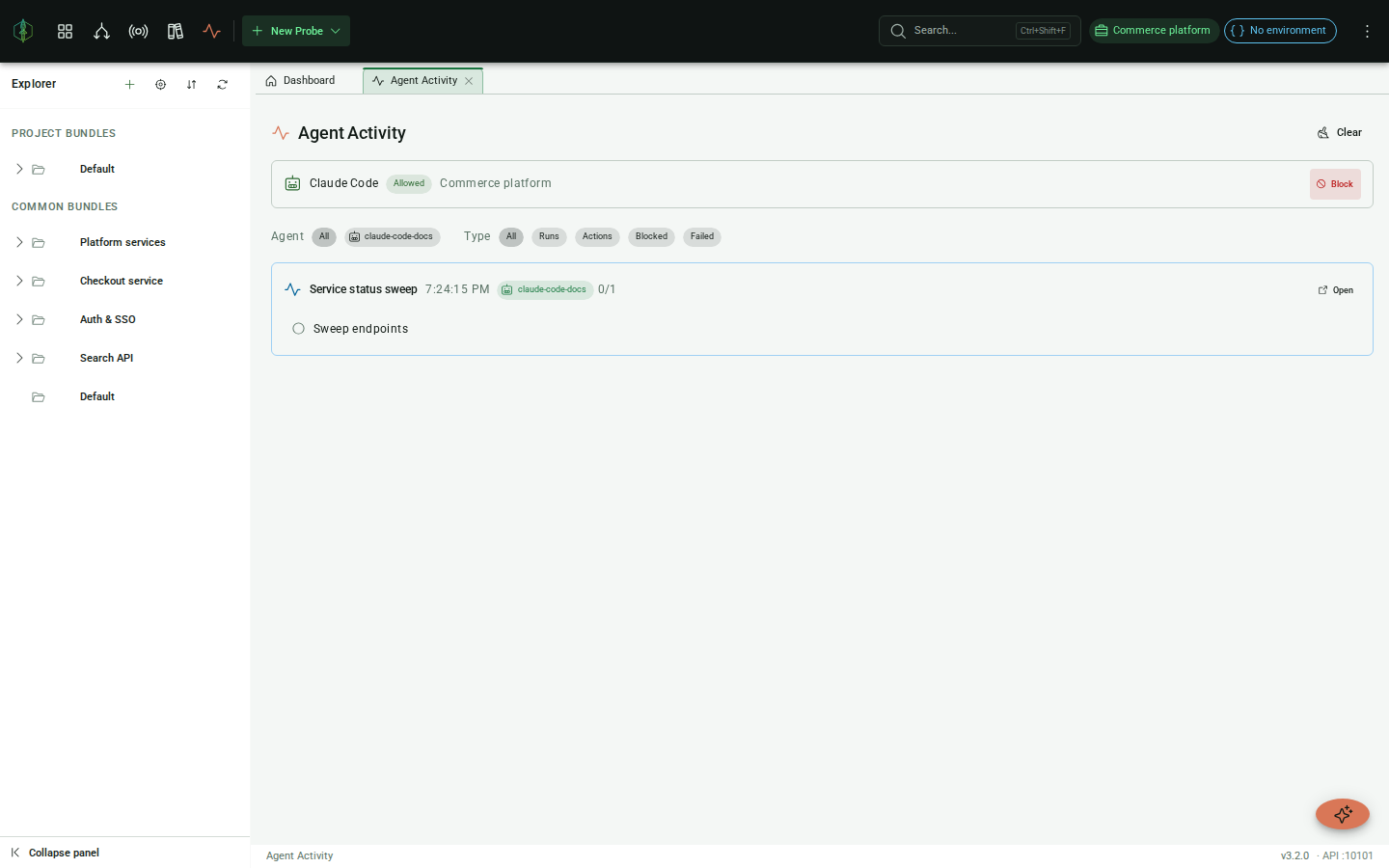
It is also where you approve one. A newly connected agent can read your workspace but cannot change or run anything until you grant it. When an agent is waiting, a notification names the agent and, once the agent has tried something it is not approved for, the tool it asked for. Review takes you to the list.
Approving is two choices. The first is which projects the agent may reach, whether it may also reach bundles that belong to no project and whether it may create projects of its own. The second is what it may do there:
- Author creates and changes bundles, probes, chains, suites and environments
- Run against targets sends probes, runs chains and suites, invokes skills and fuzzes
- Intercept and mock covers the proxy and its rules
- Out-of-band catcher covers the callback catcher for blind SSRF and injection tests
Reading the workspace needs either of the first two, so an agent you only let run things can still find the suite you asked it to run. Saving and running a script needs both. Anything outside the approval is refused and the refusal appears in the list with its reason. You can block an agent while it is working.
Keeping an agent approved
Section titled “Keeping an agent approved”An approval normally lasts for one connection, so when an agent reconnects you are asked to approve it
again. To avoid that, check Issue a token when you approve. VirtuProbe shows the token once. Add it to the
agent’s MCP server settings as the header Authorization: Bearer <token>. From then on the agent is
approved with what you last approved whenever it presents the token. The token works on the MCP
endpoint and nowhere else.
Settings > Agent tokens lists every token with its agent, what it is approved for and when it was last used. Revoking one there takes the approval away at once, so the agent’s next request waits for approval again. Blocking an agent that holds a token revokes the token too.
Running a skill requires the Engineering tier or above. Authoring one (and listing what exists) works on any tier, so the assistant can build you a skill and tell you which tier unlocks running it.
Invocations are real
Section titled “Invocations are real”Invoking a skill sends real requests to real systems. Depending on what the underlying chain does, it can send mail, write files, modify directory entries or change database rows. Treat a skill invocation as an action with consequences, not as a query. Read a skill’s description before letting an agent loose on it.