
Extractors
An extractor is attached to a chain step and pulls a value out of the step’s response into a named variable. That variable is then available to all subsequent steps in the chain via {{variableName}}.
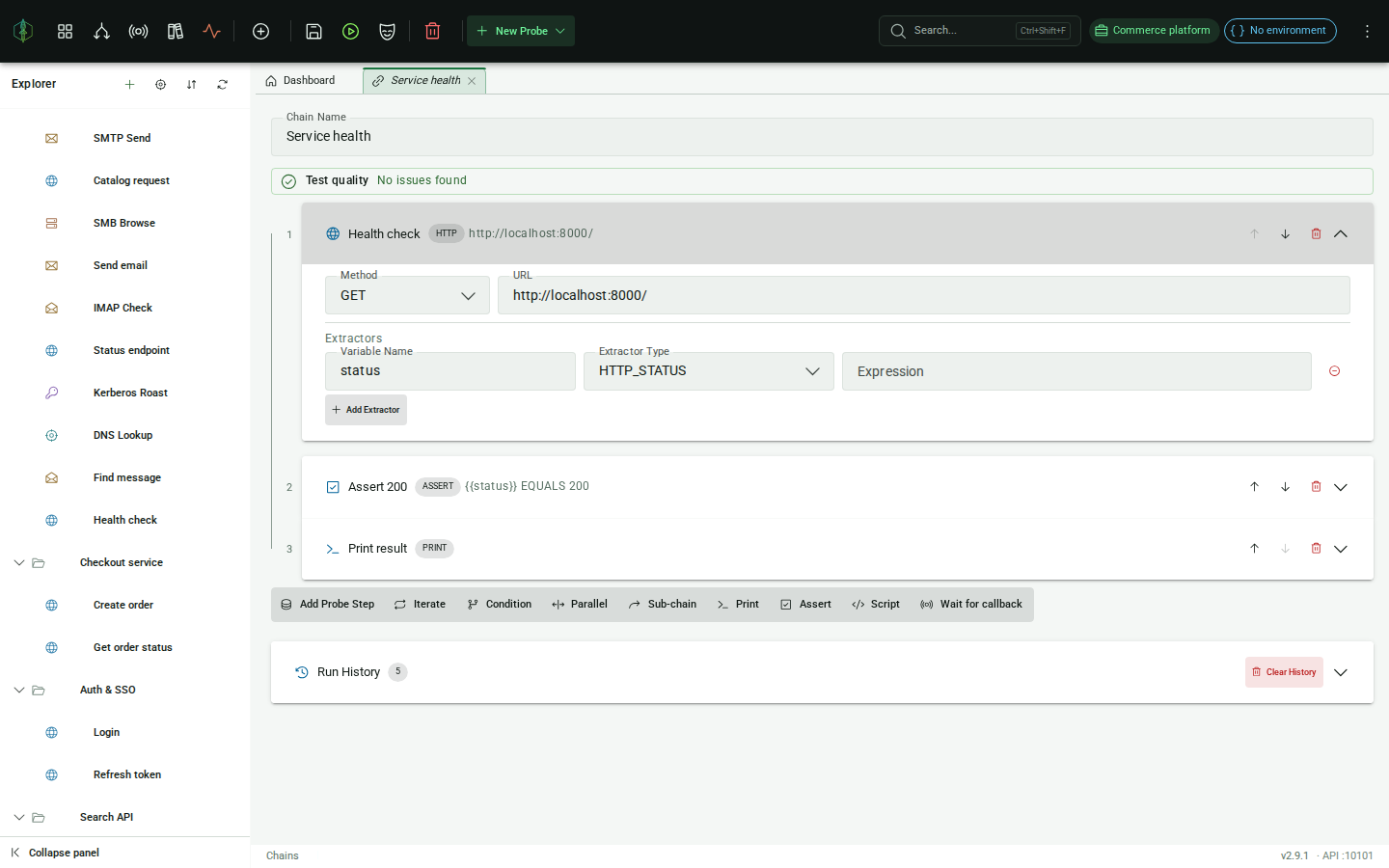
Configuration
Section titled “Configuration”| Field | Description |
|---|---|
| Type | Extractor type (protocol-specific, see below) |
| Expression | What to extract (meaning depends on type) |
| Variable name | Name of the variable to store the result in |
HTTP extractors
Section titled “HTTP extractors”HTTP_STATUS
Section titled “HTTP_STATUS”Extracts the HTTP response status code as a string.
| Field | Value |
|---|---|
| Expression | (not used) |
| Example output | "200" |
HTTP_JSON_PATH
Section titled “HTTP_JSON_PATH”Evaluates a JSONPath expression against the response body.
| Field | Value |
|---|---|
| Expression | JSONPath string, e.g. $.data.token |
| Example output | "eyJhbGci..." |
HTTP_BODY_RAW
Section titled “HTTP_BODY_RAW”Returns the entire response body as a string.
| Field | Value |
|---|---|
| Expression | (not used) |
HTTP_HEADER
Section titled “HTTP_HEADER”Returns the value of a specific response header. The lookup is case-insensitive; if the header appears multiple times the first occurrence is returned.
| Field | Value |
|---|---|
| Expression | Header name, e.g. Content-Type or X-Request-Id |
| Example output | "application/json" |
SMTP extractors
Section titled “SMTP extractors”SMTP_SUCCESS
Section titled “SMTP_SUCCESS”Returns "true" if the SMTP exchange completed without any assertion failures, "false" otherwise.
| Field | Value |
|---|---|
| Expression | (not used) |
SMTP_EXCHANGE_LINES
Section titled “SMTP_EXCHANGE_LINES”Returns the server’s response lines for a specific command, joined as a string.
| Field | Value |
|---|---|
| Expression | The command string to match (e.g. MAIL FROM:<[email protected]>) |
Leave the expression blank to match the server greeting exchange.
SMTP_OUTCOME
Section titled “SMTP_OUTCOME”Returns the transport outcome of one exchange, so a chain can branch on how it ended and not only on whether the probe as a whole worked. A reset, a timeout and a refused connection are three different findings, and a success flag cannot tell them apart.
| Field | Value |
|---|---|
| Expression | The command string, matched the way SMTP_EXCHANGE_LINES matches it, or blank for the greeting |
| Example output | "RST" |
Values are OK, EOF, RST, TIMEOUT, MALFORMED_RESPONSE, PARTIAL, CONNECT_REFUSED, CONNECT_TIMEOUT and RESOLVE_FAILED. Blank selects the greeting rather than the last exchange, because the greeting slot is also where
a failed connect is recorded.
IMAP extractors
Section titled “IMAP extractors”IMAP_SUCCESS
Section titled “IMAP_SUCCESS”Returns "true" if all IMAP commands completed successfully.
| Field | Value |
|---|---|
| Expression | (not used) |
IMAP_EXCHANGE_LINES
Section titled “IMAP_EXCHANGE_LINES”Returns the untagged server lines for a specific IMAP command.
| Field | Value |
|---|---|
| Expression | The command string to match (e.g. SEARCH UNSEEN) |
Leave the expression blank to match the server greeting.
IMAP_OUTCOME
Section titled “IMAP_OUTCOME”Returns the transport outcome of one exchange, the IMAP counterpart of SMTP_OUTCOME.
| Field | Value |
|---|---|
| Expression | The command string, matched the way IMAP_EXCHANGE_LINES matches it, or blank for the greeting |
| Example output | "TIMEOUT" |
Values are OK, EOF, RST, TIMEOUT, MALFORMED_RESPONSE, PARTIAL, CONNECT_REFUSED, CONNECT_TIMEOUT and RESOLVE_FAILED. Blank selects the greeting, which is where a failed connect is recorded.
LDAP extractors
Section titled “LDAP extractors”LDAP_SUCCESS
Section titled “LDAP_SUCCESS”Returns "true" if the LDAP operation completed without assertion failures.
| Field | Value |
|---|---|
| Expression | (not used) |
LDAP_EXCHANGE_RESULT_CODE
Section titled “LDAP_EXCHANGE_RESULT_CODE”Returns the result code for a specific LDAP operation as a string.
| Field | Value |
|---|---|
| Expression | A prefix of the operation string (e.g. BIND cn=admin) |
| Example output | "0" (success) |
LDAP_OUTCOME
Section titled “LDAP_OUTCOME”Returns the transport outcome of one operation. A result code cannot stand in for this, because an operation that died at the socket never received one.
| Field | Value |
|---|---|
| Expression | An operation prefix, matched the way LDAP_EXCHANGE_RESULT_CODE matches it, or blank for the first exchange |
| Example output | "EOF" |
Values are OK, EOF, RST, TIMEOUT, MALFORMED_RESPONSE, PARTIAL, CONNECT_REFUSED, CONNECT_TIMEOUT and RESOLVE_FAILED.
This is the extractor that makes a multi-operation LDAP sequence honest. The probe’s own success is computed from the connect and the assertions, so an operation that dies part way through a sequence still leaves a green probe. Naming that operation here is how a chain sees it.
DNS extractors
Section titled “DNS extractors”DNS_SUCCESS
Section titled “DNS_SUCCESS”Returns "true" if all DNS queries completed without any assertion failures, "false" otherwise.
| Field | Value |
|---|---|
| Expression | (not used) |
DNS_ANSWER_VALUE
Section titled “DNS_ANSWER_VALUE”Returns the value of the first answer record from a specific query.
| Field | Value |
|---|---|
| Expression | A prefix of the question string (e.g. A example.com) |
| Example output | "93.184.216.34" |
Leave the expression blank to use the first query’s answer. Useful for extracting a resolved IP and passing it to subsequent chain steps.
DNS_FLAGS
Section titled “DNS_FLAGS”Returns the response header flags, in the form dig prints them.
| Field | Value |
|---|---|
| Expression | A prefix of the question string (e.g. A example.com), or blank for the first query |
| Example output | "qr rd ra" |
DNS_AUTHORITATIVE
Section titled “DNS_AUTHORITATIVE”Returns "true" when the answer was authoritative, "false" otherwise. Selects the query the same
way DNS_FLAGS does.
| Field | Value |
|---|---|
| Expression | A prefix of the question string, or blank for the first query |
| Example output | "false" |
Whether an answer came from the zone or from a resolver’s cache is a question the record value cannot answer, since both carry the same bytes. Assert on this when a chain cares about delegation.
Kerberos extractors
Section titled “Kerberos extractors”KERBEROS_SUCCESS
Section titled “KERBEROS_SUCCESS”Returns "true" if the Kerberos operation succeeded, "false" otherwise.
| Field | Value |
|---|---|
| Expression | (not used) |
KERBEROS_HASH
Section titled “KERBEROS_HASH”Returns the hashcat-ready hash produced by a roasting operation: $krb5asrep$23$… for AS-REP roasting (mode 18200) or $krb5tgs$23$… for Kerberoasting (mode 13100). Empty string for operations that produce no hash (e.g. credential validation).
| Field | Value |
|---|---|
| Expression | (not used) |
| Example output | [email protected]:… |
Pair with an ITERATE over a username wordlist to roast a whole user list and collect hashes into chain variables.
KERBEROS_ERROR_CODE
Section titled “KERBEROS_ERROR_CODE”Returns the KDC error code (0 on success). Useful for username enumeration: 24 (KDC_ERR_PREAUTH_FAILED) means a valid account with a wrong password, while 6 (KDC_ERR_C_PRINCIPAL_UNKNOWN) means the account does not exist.
| Field | Value |
|---|---|
| Expression | (not used) |
| Example output | "24" |
SMB extractors
Section titled “SMB extractors”SMB_SUCCESS
Section titled “SMB_SUCCESS”Returns "true" if every enabled command in the SMB session completed successfully, "false" otherwise.
| Field | Value |
|---|---|
| Expression | (not used) |
SMB_LAST_STATUS
Section titled “SMB_LAST_STATUS”Returns an SMB NT status code (e.g. STATUS_SUCCESS, STATUS_ACCESS_DENIED). Useful for branching a chain on the exact result of a command (access checks, vulnerability probes).
| Field | Value |
|---|---|
| Expression | A substring of the command label (e.g. TREE_CONNECT); blank = last exchange’s status |
| Example output | "STATUS_ACCESS_DENIED" |
SMB_SHARE_LIST
Section titled “SMB_SHARE_LIST”Returns the share names from a LIST_SHARES command, newline-separated. Feed it into an ITERATE step (variable-reference source, whitespace-split) to walk every share.
| Field | Value |
|---|---|
| Expression | (not used) |
| Example output | "public\nprivate\nIPC$" |
SMB_FILE_CONTENT
Section titled “SMB_FILE_CONTENT”Returns the content read by a FILE_READ command, so a file read over SMB can feed a later chain step. UTF-8 text when decodable, otherwise a base64 fallback for binary files.
| Field | Value |
|---|---|
| Expression | A substring of the file path (e.g. secret.txt); blank = first FILE_READ result |
| Example output | "hunter2" |
SMB_RPC_LINES
Section titled “SMB_RPC_LINES”Returns the decoded MSRPC result lines from commands such as SAMR_ENUM_USERS,
SRVSVC_NETSESSIONENUM or WKSSVC_NETWKSTAUSERENUM, joined with newlines. Reads the most recent
exchange that produced any, which makes it feed an ITERATE step directly.
| Field | Value |
|---|---|
| Expression | (optional) A substring filter applied to each line, case-insensitive |
| Example output | "jdoe\nasmith\nsvc_iis" |
SMB_FILE_MATCHES
Section titled “SMB_FILE_MATCHES”Returns the entries from DIR_LIST and DIR_LIST_RECURSIVE exchanges, one per line, as the path
and the size separated by a tab. When the command carried patterns, the entries already hold only
the matches.
| Field | Value |
|---|---|
| Expression | (not used) |
SMB_SIGNING_REQUIRED
Section titled “SMB_SIGNING_REQUIRED”Returns "true" when any NEGOTIATE exchange reported that the server requires SMB signing,
"false" otherwise.
| Field | Value |
|---|---|
| Expression | (not used) |
SMB_SESSION_FLAG_IS_GUEST
Section titled “SMB_SESSION_FLAG_IS_GUEST”Returns "true" when any SESSION_SETUP exchange came back flagged as a guest session.
| Field | Value |
|---|---|
| Expression | (not used) |
A server that quietly downgrades a failed logon to guest answers successfully, so a chain asserting that authentication worked needs this to tell the two apart.
LSA_DOMAIN_SID
Section titled “LSA_DOMAIN_SID”Returns the domain SID reported by LSARPC_QUERY_INFO_POLICY.
| Field | Value |
|---|---|
| Expression | (not used) |
| Example output | "S-1-5-21-1004336348-1177238915-682003330" |
MySQL extractors
Section titled “MySQL extractors”MYSQL_SUCCESS
Section titled “MYSQL_SUCCESS”Returns "true" if the connection was established and the statement was accepted by the server, "false" otherwise.
| Field | Value |
|---|---|
| Expression | (not used) |
MYSQL_ROW_COUNT
Section titled “MYSQL_ROW_COUNT”Returns the number of rows a query returned.
| Field | Value |
|---|---|
| Expression | (not used) |
| Example output | "3" |
MYSQL_AFFECTED_ROWS
Section titled “MYSQL_AFFECTED_ROWS”Returns the number of rows affected by an update/DDL statement (-1 for a query).
| Field | Value |
|---|---|
| Expression | (not used) |
| Example output | "1" |
MYSQL_COLUMN
Section titled “MYSQL_COLUMN”Returns a single cell from the result set, the primary chaining primitive. Column names match case-insensitively; a missing cell or SQL NULL returns an empty string.
| Field | Value |
|---|---|
| Expression | column (first row), row.column, or row.colIndex, for example email, 0.email, 2.1 |
| Example output | "[email protected]" |
MYSQL_ERROR_CODE
Section titled “MYSQL_ERROR_CODE”Returns the vendor error code from a rejected statement (0 on success). Useful for branching on the exact failure.
| Field | Value |
|---|---|
| Expression | (not used) |
| Example output | "1146" |
MYSQL_JSON
Section titled “MYSQL_JSON”Returns the whole result set as a JSON array (each row an object of column → value).
| Field | Value |
|---|---|
| Expression | (not used) |
| Example output | "[{\"id\":\"1\",\"username\":\"jdoe\"}]" |
MongoDB extractors
Section titled “MongoDB extractors”MONGO_SUCCESS
Section titled “MONGO_SUCCESS”Returns "true" if the operation was accepted by the server, "false" otherwise.
| Field | Value |
|---|---|
| Expression | (not used) |
| Example output | "true" |
MONGO_DOC_COUNT
Section titled “MONGO_DOC_COUNT”Returns the number of documents returned (Find/Aggregate) or matched (Count).
| Field | Value |
|---|---|
| Expression | (not used) |
| Example output | "3" |
MONGO_FIELD
Section titled “MONGO_FIELD”Reads a field out of the returned documents. Not limited to the first document: a selector reaches any document, and [*] reaches every one.
| Field | Value |
|---|---|
| Expression | field (first doc), [n].field (doc n), [*].field (all docs, newline-joined), nested via dots (address.city) |
| Example output | "alice" |
MONGO_ERROR_CODE
Section titled “MONGO_ERROR_CODE”Returns the MongoDB error code from a rejected operation (0 on success).
| Field | Value |
|---|---|
| Expression | (not used) |
| Example output | "26" |
MONGO_JSON
Section titled “MONGO_JSON”Returns the whole result as a JSON array of the returned documents.
| Field | Value |
|---|---|
| Expression | (not used) |
| Example output | "[{\"_id\":1,\"name\":\"alice\"}]" |
PostgreSQL extractors
Section titled “PostgreSQL extractors”POSTGRES_SUCCESS
Section titled “POSTGRES_SUCCESS”Returns "true" if the statement was accepted by the server, "false" otherwise.
| Field | Value |
|---|---|
| Expression | (not used) |
| Example output | "true" |
POSTGRES_ROW_COUNT
Section titled “POSTGRES_ROW_COUNT”Returns the number of rows returned by a query.
| Field | Value |
|---|---|
| Expression | (not used) |
| Example output | "3" |
POSTGRES_AFFECTED_ROWS
Section titled “POSTGRES_AFFECTED_ROWS”Returns the number of rows affected by an update/DDL statement (-1 for a query).
| Field | Value |
|---|---|
| Expression | (not used) |
| Example output | "1" |
POSTGRES_COLUMN
Section titled “POSTGRES_COLUMN”Reads a single cell out of the result set, the primary chaining primitive.
| Field | Value |
|---|---|
| Expression | column (first row), row.column (row n), or row.colIndex (e.g. email, 0.email, 2.1) |
| Example output | "[email protected]" |
POSTGRES_ERROR_CODE
Section titled “POSTGRES_ERROR_CODE”Returns the SQLSTATE of a rejected statement (PostgreSQL’s error identity, e.g. 42P01 for an undefined table). Empty on success.
| Field | Value |
|---|---|
| Expression | (not used) |
| Example output | "42P01" |
POSTGRES_JSON
Section titled “POSTGRES_JSON”Returns the whole result set as a JSON array of row objects.
| Field | Value |
|---|---|
| Expression | (not used) |
| Example output | "[{\"id\":1,\"username\":\"alice\"}]" |
Redis extractors
Section titled “Redis extractors”REDIS_SUCCESS
Section titled “REDIS_SUCCESS”Returns "true" when the transport was fine and every exchange met its expectation, "false"
otherwise.
| Field | Value |
|---|---|
| Expression | (not used) |
REDIS_REPLY
Section titled “REDIS_REPLY”Returns the reply text of one exchange.
| Field | Value |
|---|---|
| Expression | A command, for example GET or GET user:1, or blank for the last exchange |
| Example output | "hello from virtuprobe" |
Reads the lossless rendering rather than the printable one, so a value carrying a line break can still be matched by a pattern carrying one.
REDIS_REPLY_TYPE
Section titled “REDIS_REPLY_TYPE”Returns the RESP kind of a reply: SIMPLE_STRING, ERROR, INTEGER, BULK_STRING, ARRAY,
NULL and so on.
| Field | Value |
|---|---|
| Expression | A command, or blank for the last exchange |
| Example output | "BULK_STRING" |
Worth asserting on its own, because a key that is absent answers NULL while a key holding an empty
string answers BULK_STRING, and the reply text is empty either way.
REDIS_INTEGER
Section titled “REDIS_INTEGER”Returns an integer reply as text: DBSIZE, TTL, EXISTS, the count from a DEL.
| Field | Value |
|---|---|
| Expression | A command, or blank for the last exchange |
| Example output | "9" |
Blank when the exchange answered with something that is not an integer, rather than zero. Zero is a real Redis answer, so returning it for “not an integer” would be a wrong answer rather than a missing one.
REDIS_ARRAY_ITEMS
Section titled “REDIS_ARRAY_ITEMS”Returns the elements of an array reply, one per line, which is the shape an ITERATE step consumes.
| Field | Value |
|---|---|
| Expression | A command, or blank for the last exchange |
| Example output | "first\nsecond\nthird" |
A SCAN reply is a two element array of a cursor and the keys, so the keys are unwrapped. Without
that, every iteration over a key search would start with the cursor and iterate it as though it were
a key.
REDIS_INFO_FIELD
Section titled “REDIS_INFO_FIELD”Returns one field out of an INFO reply.
| Field | Value |
|---|---|
| Expression | The field name, for example redis_version or connected_clients. Required |
| Example output | "7.2.4" |
INFO answers a bulk string of name:value lines grouped under section headers, so a field lookup
is the only practical way to assert on one number out of a hundred.
REDIS_ERROR
Section titled “REDIS_ERROR”Returns the server error message of an exchange, blank when it did not answer with an error.
| Field | Value |
|---|---|
| Expression | A command, or blank for the last exchange |
| Example output | "NOAUTH Authentication required." |
SQL Server extractors
Section titled “SQL Server extractors”MSSQL_SUCCESS
Section titled “MSSQL_SUCCESS”Returns "true" when the batch ran and the server did not report an error, "false" otherwise.
| Field | Value |
|---|---|
| Expression | (not used) |
MSSQL_COLUMN
Section titled “MSSQL_COLUMN”Returns one column value from a result set.
| Field | Value |
|---|---|
| Expression | A column name, optionally with a row index, for example total |
| Example output | "42" |
MSSQL_ROW_COUNT
Section titled “MSSQL_ROW_COUNT”Returns how many rows came back. Under the row cap this is the number you received, not the number
the table holds, so pair it with MSSQL_TRUNCATED when the difference matters.
MSSQL_RESULT_COUNT
Section titled “MSSQL_RESULT_COUNT”Returns how many result sets the batch produced. A procedure that selects twice returns "2".
MSSQL_AFFECTED_ROWS
Section titled “MSSQL_AFFECTED_ROWS”Returns the rows an INSERT, UPDATE or DELETE touched.
MSSQL_OUT_PARAM
Section titled “MSSQL_OUT_PARAM”Returns one OUT parameter of a procedure call, by name.
| Field | Value |
|---|---|
| Expression | The parameter name |
MSSQL_MESSAGES
Section titled “MSSQL_MESSAGES”Returns what the server printed, from PRINT or from RAISERROR at severity 10 or below.
An ordinary query leaves this empty, which is correct and is also what an extractor that never ran returns, so do not use an empty result on its own as evidence that a step behaved.
MSSQL_TRUNCATED
Section titled “MSSQL_TRUNCATED”Returns "true" when the row cap was reached. This is the extractor a chain needs in order to
require that nothing was cut off, because a row count alone cannot tell the data apart from our
limit.
MSSQL_ERROR_CODE
Section titled “MSSQL_ERROR_CODE”Returns the message number, for example 208 for an invalid object name. That is the number every
Microsoft reference is indexed by.
MSSQL_SQL_STATE
Section titled “MSSQL_SQL_STATE”Returns the SQLSTATE. Coarser than the message number, and the one to use in a chain that has to run against more than one database engine.
MSSQL_JSON
Section titled “MSSQL_JSON”Returns a value out of a JSON column.
FTP extractors
Section titled “FTP extractors”FTP_SUCCESS
Section titled “FTP_SUCCESS”Returns "true" when the transport was fine and every command met its expectation, "false"
otherwise.
| Field | Value |
|---|---|
| Expression | (not used) |
FTP_REPLY_CODE
Section titled “FTP_REPLY_CODE”Returns a reply code, for example 226 for a completed transfer.
| Field | Value |
|---|---|
| Expression | A command, or blank for the last exchange |
FTP_REPLY_LINES
Section titled “FTP_REPLY_LINES”Returns the reply text, including every line of a multi-line reply such as the banner.
FTP_LIST
Section titled “FTP_LIST”Returns the directory listing, one entry per line.
Newline separated so that an ITERATE step can walk it directly, which is what makes the chain follow what the server actually holds rather than a list of paths written in advance.
FTP_FILE_CONTENT
Section titled “FTP_FILE_CONTENT”Returns the contents of a downloaded file, as text.
FTP_FILE_HEX
Section titled “FTP_FILE_HEX”Returns the same bytes as hex, for a file that is not text.
FTP_BYTE_COUNT
Section titled “FTP_BYTE_COUNT”Returns how many bytes were transferred.
Freestyle extractors
Section titled “Freestyle extractors”Freestyle probes run a list of labeled exchanges down one connection, so most of these take an exchange label as the expression. Leaving it blank addresses the last exchange.
FREESTYLE_SUCCESS
Section titled “FREESTYLE_SUCCESS”Returns "true" if the probe completed, "false" otherwise.
| Field | Value |
|---|---|
| Expression | (not used) |
| Example output | "true" |
FREESTYLE_TEXT
Section titled “FREESTYLE_TEXT”Returns the bytes received in an exchange, as text.
| Field | Value |
|---|---|
| Expression | Exchange label, or blank for the last exchange |
| Example output | "220 mail.example.com ESMTP" |
FREESTYLE_HEX
Section titled “FREESTYLE_HEX”Returns the bytes received, as hex. This is the form a later exchange’s Hex payload accepts
directly, so it is how you feed one reply back into the next request.
| Field | Value |
|---|---|
| Expression | Exchange label, or blank for the last exchange |
| Example output | "3220302e310d0a" |
FREESTYLE_HEX_SLICE
Section titled “FREESTYLE_HEX_SLICE”Returns bytes at a known position, as hex, for a binary reply with no text form. A slice that runs past the end is clamped rather than refused, because a short reply is itself a finding.
| Field | Value |
|---|---|
| Expression | label|offset:length, e.g. header|4:2 |
| Example output | "00a3" |
FREESTYLE_REGEX
Section titled “FREESTYLE_REGEX”Applies a regular expression to the received text and returns the first capture group, or the whole match when the pattern has none. Use it to pull a session id, a version or a status word out of a banner.
| Field | Value |
|---|---|
| Expression | label|regex, or a bare regex against the last exchange |
| Example output | "1.4.2" |
FREESTYLE_BYTE_COUNT
Section titled “FREESTYLE_BYTE_COUNT”Returns how many bytes came back.
| Field | Value |
|---|---|
| Expression | Exchange label, or blank for the last exchange |
| Example output | "512" |
FREESTYLE_OUTCOME
Section titled “FREESTYLE_OUTCOME”Returns the transport outcome, so a chain can branch on how an exchange ended rather than only on whether it worked.
| Field | Value |
|---|---|
| Expression | Exchange label, or blank for the last exchange |
| Example output | "RST" |
Generic extractors
Section titled “Generic extractors”CONSTANT
Section titled “CONSTANT”Stores a fixed value into a variable, which is how you pass a hardcoded value or a default through the chain context.
| Field | Value |
|---|---|
| Expression | The literal string value to store |
Applies a regular expression to the string representation of the step response and returns the first capture group (or the full match if no groups are defined).
| Field | Value |
|---|---|
| Expression | Regex pattern, e.g. token=([A-Za-z0-9]+) |
| Example output | "abc123" |
Most useful when the response is already a plain string, for example on an IMAP step whose exchange lines contain structured text, or in the scripting engine where you can pass any string response. For HTTP responses, combine with HTTP_BODY_RAW in a scripting context if you need regex over the body.